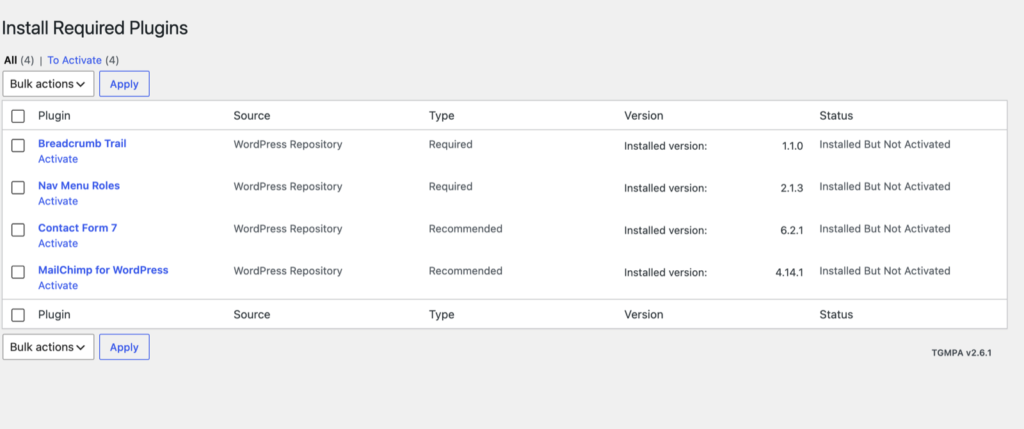
When you first activate the theme you’ll see a notice on your dashboard asking you to install a number of plugins. Allow the theme to install them for you:
- Go to Appearance → Install Plugins (or click Begin installing plugins in the notice).
- Check the box at the top of the list to select all plugins.
- Choose Install in the Bulk actions menu and click Apply. The plugins are installed and activated one after another.
Activate your license first (see Theme Activation): the bundled premium plugins and the Alchemists sport plugins only appear in the list once the license is active.
What gets installed
Required: SportsPress, WPBakery Page Builder, Alchemists Extensions, Redux Framework, Secure Custom Fields, One Click Demo Import, Breadcrumb Trail and Nav Menu Roles.
Recommended: WooCommerce with the Alchemists WooCommerce Grid / List toggle and Alchemists Color Filters for WooCommerce, Contact Form 7, MailChimp for WordPress, Slider Revolution, DF Social Count, Smash Balloon Social Photo Feed and Custom Twitter Feeds.
Sport plugins
The list also depends on the sport chosen in SportsPress (SportsPress → Settings → General → Sport). Each sport has its own Alchemists plugin with its statistics and settings:
- Basketball: Alchemists Basketball for SportsPress
- Soccer: Alchemists Soccer for SportsPress
- American Football: Alchemists American Football for SportsPress
- eSports: Alchemists League of Legends for SportsPress
- Ice Hockey: Alchemists Ice Hockey for SportsPress, plus the official SportsPress for Ice Hockey extension (recommended)
The Hockey design doesn’t use DF Social Count, Slider Revolution, Smash Balloon Social Photo Feed or Custom Twitter Feeds, so they aren’t offered when the sport is Ice Hockey.
Once every plugin is installed and active, the Install Plugins item disappears from the Appearance menu. It comes back when a plugin needs an update or a new one is added in a theme update.