In the Hockey design a game page comes in two layouts, set in Theme Options → SportsPress → Event → Layout:
- Classic: the SportsPress game page with all sections on one page, as in previous versions. This is the default, so existing sites keep their game pages after the update.
- Extended: a scoreboard at the top and subpages, each with its own address (e.g.
/event/name/box-score/).
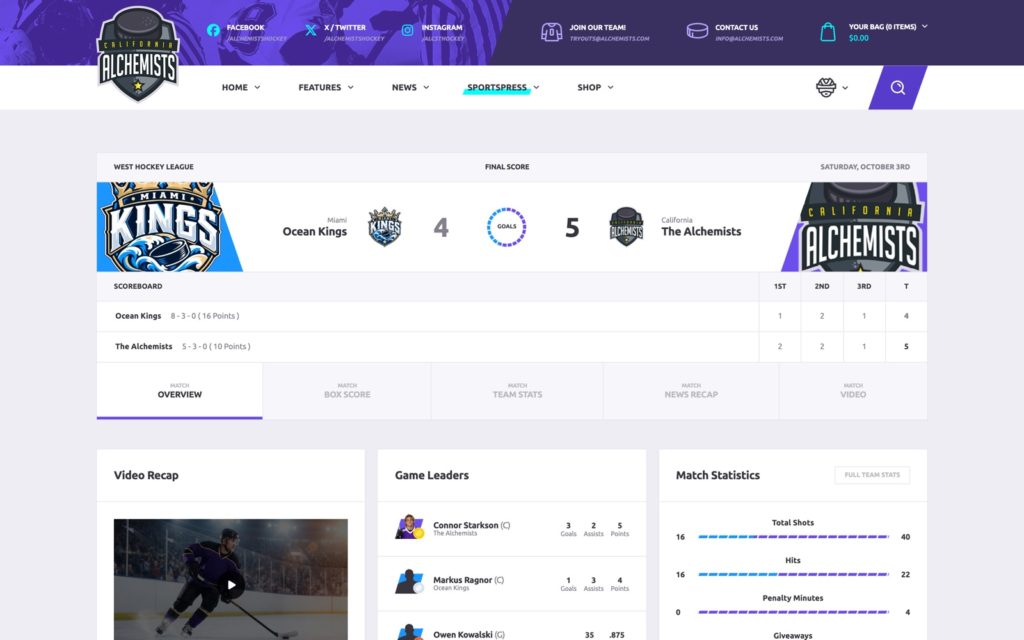
The Extended subpages
- Overview: the game’s content, built with WPBakery Page Builder. New games start with the [ALC] Hockey game overview template (video recap, game leaders, scoring summary, latest encounters, match statistics, match information, teams streak, next rivals). Games without content of their own show the same overview automatically.
- Box Score: one card per team with the players grouped by position, their game statistics, the goalie save percentage and the team totals. It follows the Box Score settings of SportsPress.
- Team Stats: the match statistics, the scoring summary and the game leaders.
- News Recap: a blog post about the game. Pick it in the Game Recap box of the game (Recap Article); the subpage is hidden on games without one.
- Video: the video of the game (the SportsPress Video field).
The subpages can be reordered, turned off, relabeled and given other slugs in Theme Options → SportsPress → Event → Event Subpages Layout, with the Subtitle Label (“Match”) and the Navigation Type (Fit, Full Width or Boxed).
The Match Information box lists the officials of a game (Referee, Linesman). It needs the Officials module of SportsPress (SportsPress → Settings → Modules), which the Hockey demo import turns on.